
# 迭代-仪表盘
# 介绍
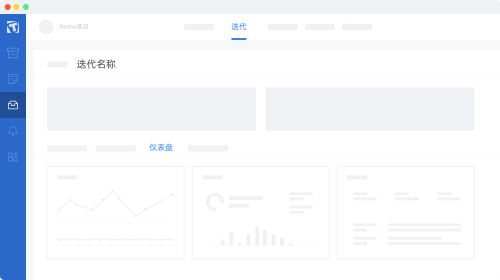
迭代-仪表盘页面扩展提供了迭代详情页面仪表盘的扩展能力,如下图所示
# 使用方式
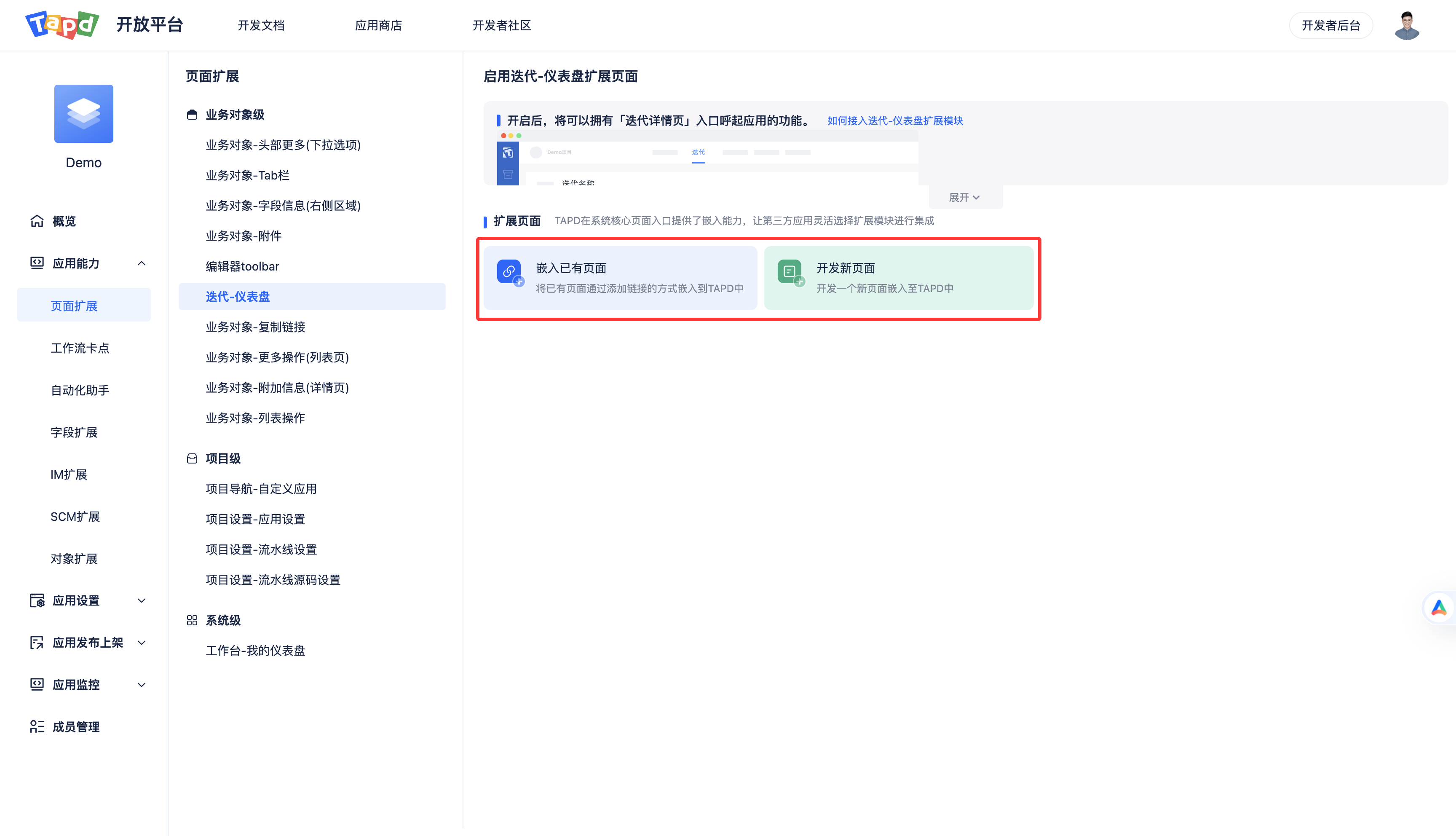
迭代-仪表盘 页面扩展支持嵌入已有页面和开发新页面两种使用方式。
如果有现成的页面,推荐使用嵌入已有页面方式;如果页面还没开发,推荐使用开发新页面方式。
# 方式一:嵌入已有页面
# 页面配置
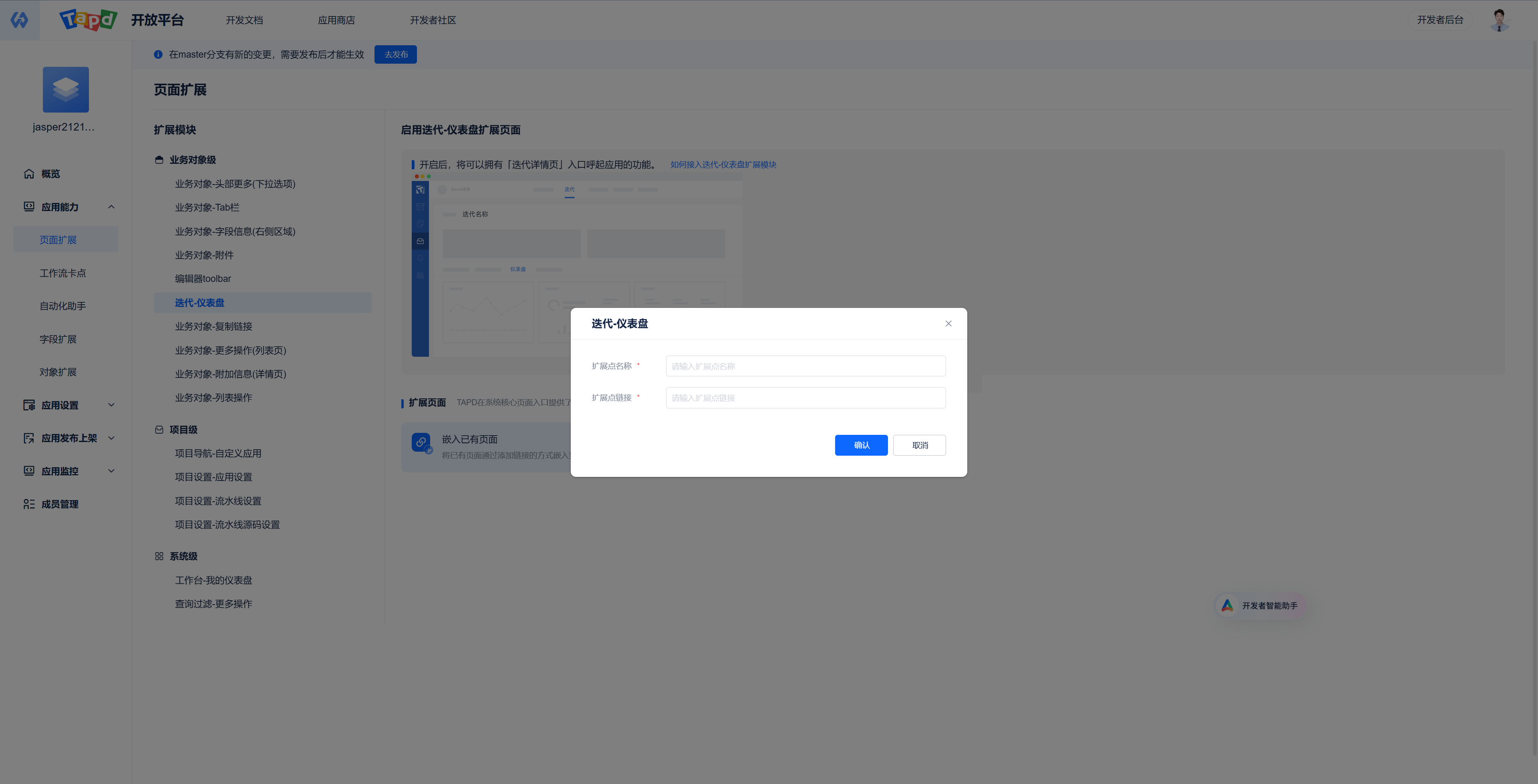
配置说明如下
| 配置名 | 格式 | 必填 | 示例 | 说明 |
|---|---|---|---|---|
| 扩展点名称 | STRING (0,20] | 是 | Demo-迭代仪表 | 迭代仪表盘扩展标题 |
| 扩展点链接 | URL | 是 | https://tapd.woa.com/open_demo/app_for_iteration_dashboard?workspace_id=$workspace.id$&obj_type=$object.type$&obj_id=$object.id$ | 扩展的地址 |
配置示例
# 上下文参数
支持业务对象级和项目级 上下文参数,可参考 通用说明-上下文参数 按需使用
# 事件通信
如果嵌入的页面需要和TAPD的页面进行通信,可参考 模块通信事件 和 事件通信示例 按需实现
# 方式二:开发新页面
使用开发新页面方式前需准备好开发环境,可参考 TAPD插件应用开发快速入门 配置,并且学习 TAPD插件应用开发必读,了解基础的开发知识
通过命令tplugin-cli resources,快速初始化一份Demo配置和代码,Demo内容如下:
# plugin.yaml 配置
在 app/resources 下加入以下配置
app:
  resources:
    - name: Demo-迭代仪表盘
      tag: iteration
      key: app_for_iteration_dashboard
      path: pages/app_for_iteration_dashboard_iteration
2
3
4
5
6
配置说明如下
| 配置名 | 格式 | 必填 | 示例 | 说明 |
|---|---|---|---|---|
| key | fixed | 是 | app_for_iteration_dashboard | 页面扩展标识,每种扩展页面唯一,本页面扩展的标识是 app_for_iteration_dashboard |
| path | string | 是 | pages/app_for_iteration_dashboard_iteration | 扩展页面代码的路径,相对于 resources 目录的路径 |
| tag | enum | 是 | story | 生效范围 story:需求 bug:缺陷 iteration:迭代 |
| name | string (0,20] | 是 | Demo-迭代仪表盘 | 迭代仪表盘扩展标题 |
# 示例代码
在插件代码 resources/pages/ 目录下创建 app_for_iteration_dashboard_iteration 目录,并在该目录下创建 welcome.vue 和 index.js 两个文件 在插件代码的 handler 目录创建 hello.js 文件
welcome.vue 示例代码
<template>
  <div class="welcome">
    <t-table
        :data="storyList"
        :columns="columns"
        :rowKey="rowKey"
        :loading="isLoading"
        bordered
        stripe
    >
    </t-table>
  </div>
</template>

<script>
  // 前端JSSDK,具体文档参考:http://o.tapd.woa.com/document/plugin-doc/learning/fe-jssdk/
  import SDK from '@tencent/tapd-open-js-sdk'

  export default {
    data() {
      return {
        isLoading: false,                 // 是否loading
        storyList: [],                    // 需求列表
        rowKey: 'property',
        columns: [
          {
            colKey: 'Story.id',
            title: '需求ID'
          }, {
            colKey: 'Story.name',
            title: '需求名称'
          }, {
            colKey: 'Story.creator',
            title: '创建人',
          }, {
            colKey: 'Story.created',
            title: '创建时间',
          },
        ],
      };
    },
    async mounted() {
      // 初始化JS-SDK
      this.sdk = SDK();

      // 获取当前扩展点的上下文数据
      const entranceData = await this.sdk.context.getEntranceData();

      this.isLoading = true;

      // 调用handler文件夹下hello文件的getIterationStories方法
      const data = await this.sdk.handler("hello.getIterationStories", {
        entityId: entranceData.entityId
      })

      this.storyList = data;

      this.isLoading = false;
    }
  };
</script>

<style lang="less">
  .welcome {
    color: #3582fb;
    font-size: 20px;
    text-align: center;
  }
</style>
2
3
4
5
6
7
8
9
10
11
12
13
14
15
16
17
18
19
20
21
22
23
24
25
26
27
28
29
30
31
32
33
34
35
36
37
38
39
40
41
42
43
44
45
46
47
48
49
50
51
52
53
54
55
56
57
58
59
60
61
62
63
64
65
66
67
68
69
70
tapd-open-js-sdk 参考 前端JSSDK
index.js 示例代码
import Vue from 'vue';
import welcome from './welcome.vue';
import tplugin from 'tdesign-vue/dist/tdesign.min.js';
import 'tdesign-vue/dist/tdesign.min.css';

Vue.use(tplugin);

// 渲染组件到#app
new Vue({
    el: '#app',
    render: h => h(welcome),
});
2
3
4
5
6
7
8
9
10
11
12
hello.js 添加以下代码
const { tapdSdk } = require('@tencent/tplugin-core');

exports.getIterationStories = (response = {}) => {
  const data = response.data || {};
  const storyList = tapdSdk.getStories({
    workspace_id: response.workspace_id,
    iteration_id: data.entityId,
  }).then(data => data.data)
    .catch((e) => {
      console.log(e);
    });
  return storyList;
};
2
3
4
5
6
7
8
9
10
11
12
13
# 上下文参数
# 业务对象级
# 业务对象通用上下文参数
| 参数名称 | 参数描述 |
|---|---|
| object.type | 业务对象类型,iteration |
| object.id | 业务对象 ID |
# iteration 上下文参数
| 参数名称 | 参数描述 |
|---|---|
| object.name | 标题 |
| object.release_id | - |
| object.workspace_id | - |
| object.startdate | - |
| object.enddate | - |
| object.creator | - |
| object.created | - |
| object.modified | - |
| object.completed | - |
| object.status | - |
| object.custom_field_1 | 迭代的自定义字段一(可能会有) |
| object.custom_field_2 | 迭代的自定义字段二(可能会有) |
# 项目级
项目级上下文参数支持所有项目级扩展页面、业务对象级扩展页面
| 参数名称 | 参数描述 |
|---|---|
| workspace.id | 当前所在项目id |
| workspace.name | 当前所在项目名称 |
| workspace.pretty_name | 当前所在项目英文名称 |
| workspace.parent_id | 当前所在项目父项目id |
| workspace.created | 当前所在项目创建时间 |
| workspace.creator | 当前所在项目创建人 |
| workspace.status | 当前所在项目状态 |
# 系统级
系统级上下文参数支持所有扩展页面
| 参数名称 | 参数描述 |
|---|---|
| system.user.id | 当前登录用户id |
| system.user.nick | 当前登录用户nick |
| system.user.name | 当前登录用户名字 |
| system.user.name_pinyin | 当前登录用户拼音名 |
| system.user.enabled | 当前登录用户状态 |
| system.user.status_name | 当前登录用户是否在职 |
| system.user.bu_id | 当前登录用户bu_id |
| system.user.bu_name | 当前登录用户bu_name |
| system.user.dept_id | 当前登录用户dept_id |
| system.user.dept_name | 当前登录用户dept_name |
| system.user.group_id | 当前登录用户group_id |
| system.user.group_name | 当前登录用户group_name |
| system.user.group_names | 当前登录用户group_names |
| system.user.post_name | 当前登录用户post_name |
# 事件通信
如果嵌入的页面需要和TAPD的页面进行交互,可通过TAPD提供的JSSDK完成交互。
# 安装
# 使用
# SDK方法
# SDK-调用TAPDUI
调用tapd的消息提示组件
.alert(message: string)sdk.ui.alert('Hello World')1调用TAPD侧的确认框
.confirm(message: string) => Promisesdk.ui.confirm('来个点赞3连?') .then(() => { alert('THX 😍') })1
2
3
4调用TAPD侧弹框
.openDialog(params)sdk.ui.openDialog(params)1- 参数说明:
title: string   (弹窗标题)
url: string   (弹窗URL)
height: number    (高度)
width: number   (宽度)
showBtn: boolean    (是否显示确认按钮)
btnYesText: string    (确认按钮文本)
btnNoText: string   (取消按钮文本)
1
2
3
4
5
6
7关闭TAPD侧弹窗
.closeDialog()sdk.ui.closeDialog()1调整弹框大小
.resizeDialog(width: number, height: number)sdk.ui.resizeDialog(300, 400)1在tapd全屏显示图片预览
.showImage(data: string)注意: 需要安装
3.25.0及以上版本的open-js-sdk。// url sdk.ui.showImage('https://file.tapd.woa.com/xxxxxx/files/get_logo/xxxxxx.jpg') // base64 sdk.ui.showImage('data:image/png;base64,xxxxxxxxxxxxxxxxxxxxxxxxxxxxxxxxxxxxxxxxxx')1
2
3
4
# SDK-调用插件handler
- function调用
.handler(handlerName: string, params = {}) => Promise <res>sdk.handler('story', {id: 'tsets'});1- 参数说明:
handlerName: 接口名
params: 传递给接口的参数。只支持普通对象
1
2
# SDK-调用navigator
于TAPD侧打开调用sdk的嵌入应用新的页面。url 为嵌入应用的路由
.openAppIndex(url: string)sdk.navigator.openAppIndex('/about')1打开TAPD业务对象的详情页(目前只支持需求,任务,缺陷)
.openObjectWindow(params: { entityType: string, entityId: string })sdk.navigator.openObjectWindow({entityType: 'story', entityId: '123'})1更新当前浏览器的路由,一般用于同步嵌入应用路由与浏览器路由
.syncUrl(options: {url: string, refresh: bolean})sdk.navigator.syncUrl({url: 'exmaple.com', refresh: true})1- 参数说明:
url: 目标路由
refresh: 更新路由后是否刷新页面
1
2更新Tab页扩展模块的数值
.updateTabCount({count: number, refresh: bolean})sdk.navigator.updateTabCount({count: 100, refresh: false})1- 参数说明:
count: 数值
refresh: 更新路由后是否刷新页面(默认为false)
1
2详情页Tab切换(目前只支持需求,任务,缺陷详情页)
.openObjectTab({tabName: string})sdk.navigator.openObjectTab({tabName: '变更历史'})1- 参数说明:
tabName: Tab名称1
# SDK-获取context
获取当前页面嵌入TAPD的配置信息
.getEntranceData() => Promise <entranceConfigs >const entranceConfigs = await sdk.context.getEntranceData() // return {appId, entranceId, code}1- 返回值说明:
返回 entranceConfigs
appId: 应用ID
code: tapd Token
entranceId: 挂载点ID
1
2
3
4更新tapd授予码code,一般用于授权码过期
.refreshCode() => Promise <code>const newCode = await sdk.context.refreshCode()1
# SDK-iframe通信
当在TAPD的页面中有多个挂载点页面,可以通过这个方法在不同挂载点间通信
.syncPageEvent(params: {entranceId: string, data: any}) => Promisesdk.iframe.syncPageEvent({ entranceId: 'app_for_obj_detail_bottom_card', data: { msg: '下次一定' } })1
2
3
4
5
6调整应用在TAPD侧的高度
.setPageHeight(height: number)sdk.iframe.setPageHeight(400)1
# SDK-调用command
当嵌入应用页面在tapd的业务对象(需求,任务,缺陷)详情页面,将更新页面里的附件列表
.refreshAttachmentList()sdk.command.refreshAttachmentList()1当嵌入应用页面在tapd的业务对象(需求,任务,缺陷)详情页面, 可以唤起挂在类型为 app_for_obj_detail_bottom_card 的挂载页面
.showObjDetailBottomCard()sdk.command.showObjDetailBottomCard()1
# SDK-调用request
调用tapd侧的人名搜索接口
.getUserListByKeyWords(params: {key_word: string, workspace_id: string, per_page: number}, configs: {timeout: number }) => Promise <response>sdk.request .getUserListByKeyWords({ key_word: 'tom', workspace_id: '1' }) .then((response) => { console.log(response) })1
2
3
4
5
6
7
8- 参数说明:
keyword: String (搜素的关键字)
workspace_id: String (TAPD项目ID)
1
2- 返回值说明:
返回 response
data: Array (用户列表)
1
2调用TAPD侧获取项目下人员名单接口
.getWorkspaceMemberList(params: {workspace_id: string,page_size: number, page: number }) => Promise<response>sdk.request .getWorkspaceMemberList({ page_size: 100, workspace_id: '1', page: 1 }) .then((response) => { console.log(response) })1
2
3
4
5
6
7
8
9- 参数说明:
page_size: Number (每页条数)
workspace_id: String (TAPD项目ID)
page: Number (第几页)
1
2
3- 返回值说明:
返回 response
data: Array (用户列表)
count: String (总人数)
1
2
3获取对象相关成员名单
.getAllRelateMember(params: object}) => Promisesdk.request.getAllRelateMember({ workspace_id: '755', entity_type: 'bug', entity_id: '1000000755089798713', include_self: 1 include_relate_story_member: 0 include_sub_story_member: 0 }) .then((response) => { console.log(response) })1
2
3
4
5
6
7
8
9
10
11- 参数说明:
workspace_id: String (TAPD项目ID)
entity_type: String (资源类型: story|bug|task)
include_self: Number (是否包括用户: 0 | 1)
include_relate_story_member: Number (是否包含关联需求: 0 | 1)
include_sub_story_member: Number (是否包含子需求: 0 | 1)
1
2
3
4
5- 返回值说明:
返回 response
data: Array (用户列表)
1
2
# SDK-event监听
监听来着TAPD侧的事件
.on(event: string, cb: data => res, config: {once: bolean})sdk.events.on('ConfirmYes', function() { return { id: 'target Objct ID' } }, { once: true })1
2
3
4
5
6
7- 参数说明:
event: 事件名
cb: 回调函数,参数为接受的数据,当在函数中返回数据时,将会把返回的数据发回给TAPD
once: 是否只监听一次
1
2
3发送事件给TAPD侧
.send({event: string, params: obj})// 特定的挂在点接受特定的事件,如下例子为列表更多操作拓展获取筛选条件、选中项目 const selected = await sdk.events.send({ event: 'getSelectedContext', })1
2
3
4- 参数说明:
event: 事件名1
← 编辑器toolbar 业务对象-复制链接 →