
# 业务对象-头部更多(下拉选项)
# 介绍
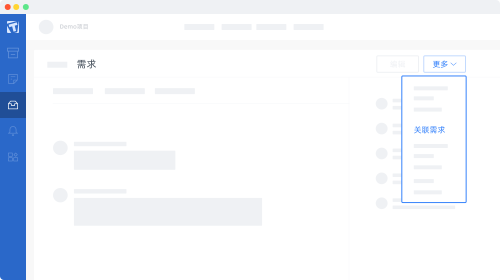
业务对象-头部更多页面扩展提供了业务对象页面头部更多下拉菜单的扩展能力,如下图所示
# 使用方式
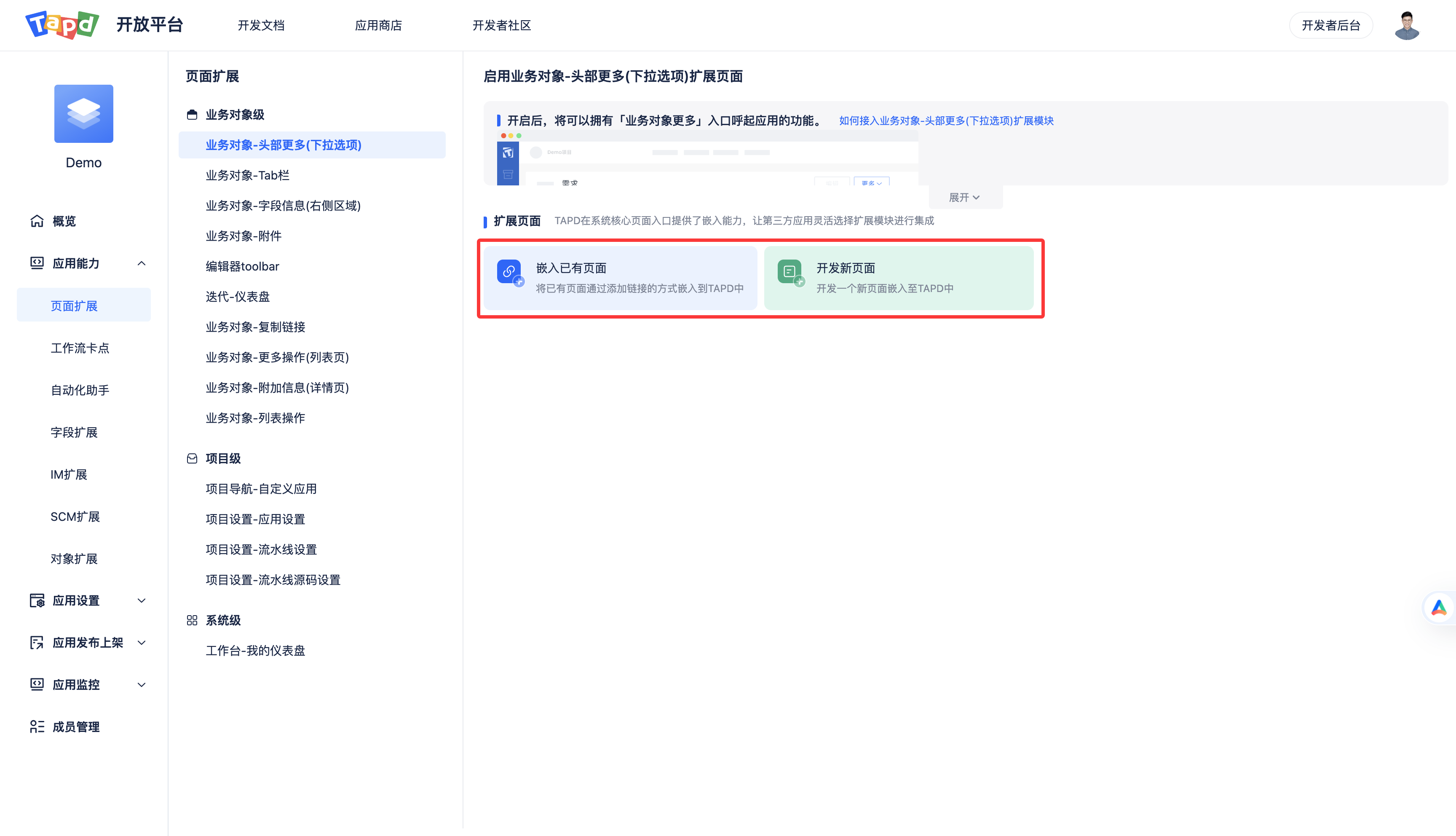
业务对象-头部更多页面扩展支持嵌入已有页面和开发新页面两种使用方式。
如果有现成的页面,推荐使用嵌入已有页面方式;如果页面还没开发,推荐使用开发新页面方式。
# 方式一:嵌入已有页面
# 页面配置
配置说明如下
| 配置名 | 说明 | 格式 | 必填 | 示例 |
|---|---|---|---|---|
| 扩展点名称 | Tab名称 | STRING (0,20] | 是 | DemoTab |
| 扩展点链接 | 扩展的地址 | URL | 是 | https://tapd.woa.com/open_demo/app_for_obj_more?workspace_id=$workspace.id$&obj_type=$object.type$&obj_id=$object.id$ |
| 是否启用弹窗 | 选择「是」:则在点击扩展点后打开弹窗;选择「否」:则在点击扩展点后打开新的标签页。 | BOOLEAN DEFAULT: 是 | 否 | |
| 弹窗高度 | 生效时机:启用弹窗=“是” | INTEGER (0,1080] DEFAULT:500 | 否 | |
| 弹窗宽度 | 生效时机:启用弹窗=“是” | INTEGER (0,1920] DEFAULT:800 | 否 | |
| 隐藏弹窗按钮 | 生效时机:启用弹窗=“是”, 选择「是」:则隐藏弹窗底部按钮;选择「否」:则显示弹窗底部按钮。 | BOOLEAN DEFAULT:false | 否 |
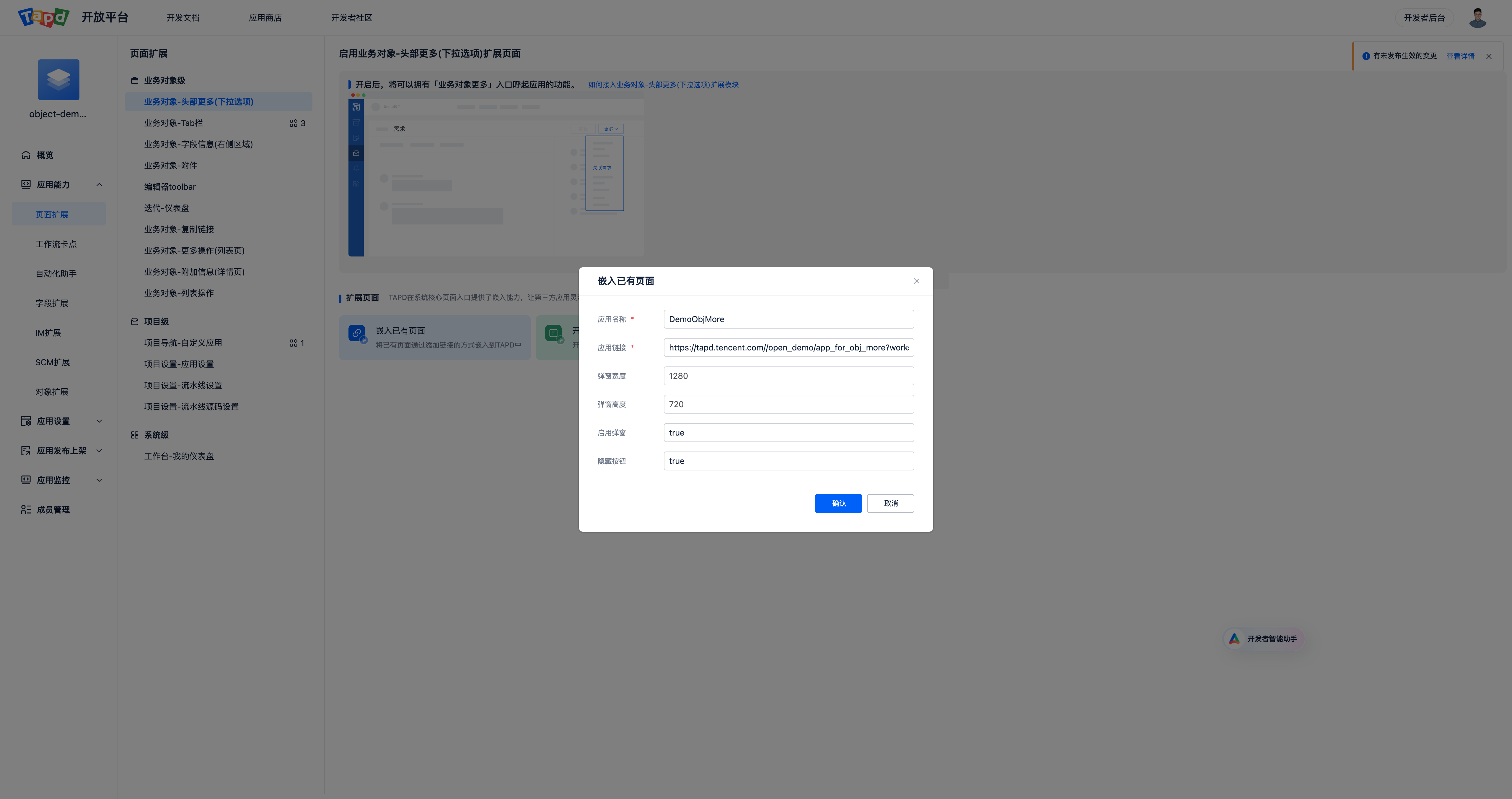
配置示例
# 方式二:开发新页面
使用开发新页面方式前需准备好开发环境,可参考 TAPD插件应用开发快速入门 配置,并且学习 TAPD插件应用开发必读,了解基础的开发知识
通过命令tplugin-cli resources,快速初始化一份Demo配置和代码,Demo内容如下:
# plugin.yaml 配置
在 app/resources 下加入以下配置,以下仅配置了需求和缺陷的,可根据需要配置任务和迭代的
app:
  resources:
    - name: 编辑关联Demo单
      hidden_footer: false
      enable_dialog: true
      tag: story
      key: app_for_obj_more
      path: pages/app_for_obj_more_story
    - name: 编辑关联Demo单
      hidden_footer: false
      enable_dialog: true
      tag: bug
      key: app_for_obj_more
      path: pages/app_for_obj_more_bug
2
3
4
5
6
7
8
9
10
11
12
13
14
配置说明如下
| 配置名 | 格式 | 必填 | 示例 | 说明 |
|---|---|---|---|---|
| key | fixed | 是 | app_for_obj_more | app_for_obj_more |
| path | string | pages/app_for_obj_more_story | 扩展页面代码的路径,相对于 resources 目录的路径 | |
| tag | enum | 是 | story | 生效范围 story:需求 bug:缺陷 iteration:迭代 |
| name | string (0,20] | 是 | 编辑关联Demo单 | 头部更多下拉菜单名 |
| enable_dialog | bool | 否 DEFAULT: true | true | true:则在点击扩展点后打开弹窗; false:则在点击扩展点后打开新的标签页。 |
| height | int (0,1080] | 否 DEFAULT:500 | 500 | |
| width | int (0,1920] | 否 DEFAULT:800 | 800 | |
| hidden_footer | bool | 否 DEFAULT:false | false | 隐藏弹窗按钮, 生效时机:启用弹窗=“是”, 选择「是」:则隐藏弹窗底部按钮;选择「否」:则显示弹窗底部按钮。 |
# 示例代码
在插件代码的 resources/pages/ 目录下创建 app_for_obj_more_story 和 app_for_obj_more_bug 目录,并在两个目录分别创建 index.js 和 welcome.vue 两个文件
welcome.vue 示例代码
<template>
  <div class="wrapper">
    <t-form
        :data="formData"
        ref="form"
        @reset="onReset"
        @submit="onSubmit"
        :colon="true"
    >
      <t-form-item label="会议名" name='name'>
        <t-input v-model="formData.name" placeholder="请输入内容"></t-input>
      </t-form-item>
      <t-form-item label="会议描述" name='desc'>
        <t-input v-model="formData.desc" placeholder="请输入内容"></t-input>
      </t-form-item>
      <t-form-item label="会议时间" name='time'>
        <t-date-picker
            theme="primary"
            mode="date"
            format="YYYY-MM-DD HH:mm:ss"
            enableTimePicker
            v-model="formData.time"
        ></t-date-picker>
      </t-form-item>
      <t-form-item style="padding-top: 8px">
        <t-button theme="primary" type="submit" style="margin-right: 10px">提交</t-button>
      </t-form-item>
    </t-form>
  </div>
</template>

<script>
  import SDK from '@tencent/tapd-open-js-sdk'

  export default {
    data() {
      return {
        formData: {}
      };
    },
    async mounted() {
      // 初始化JS-SDK
      this.sdk = SDK();
      // 获取扩展点上下文数据
      const entranceData = await this.sdk.context.getEntranceData();
      // 组装表单数据,扩展对象类型(需求/缺陷/任务/迭代) + 扩展对象ID
      this.formData.name = entranceData.entityType + ' ' + entranceData.entityId;
      this.formData.time = new Date();

      this.isLoading = false;
    },
    methods: {
      onReset() {

      },
      onSubmit() {
        // 提交后关闭输入弹窗
        this.sdk.ui.closeDialog({status: true})
      }
    }
  };
</script>

<style lang="less">
  .wrapper {
    padding: 120px;
  }
</style>
2
3
4
5
6
7
8
9
10
11
12
13
14
15
16
17
18
19
20
21
22
23
24
25
26
27
28
29
30
31
32
33
34
35
36
37
38
39
40
41
42
43
44
45
46
47
48
49
50
51
52
53
54
55
56
57
58
59
60
61
62
63
64
65
66
67
68
69
tapd-open-js-sdk 参考 前端JSSDK
index.js 示例代码
import Vue from 'vue';
import welcome from './welcome.vue';
import tplugin from 'tdesign-vue/dist/tdesign.min.js';
import 'tdesign-vue/dist/tdesign.min.css';

Vue.use(tplugin);

// 渲染组件到#app
new Vue({
    el: '#app',
    render: h => h(welcome),
});
2
3
4
5
6
7
8
9
10
11
12
# 上下文参数
# 什么是上下文参数
上下文参数可以让开发者通过在扩展页面的入口地址或者其他配置拼接相应的参数来获取上下文信息,有业务对象级、项目级和系统级三大类,对应三大类扩展页面。
TAPD调用插件的handler函数时,会传递相关上下文参数。
# 如何获取
url参数解析
页面扩展支持使用url直接接入已经开发完成的第三方页面,可以通过在url中添加上下文变量,向页面传递TAPD信息。 页面扩展分为三类:业务对象级、系统级、项目级。
假设你的入口地址是
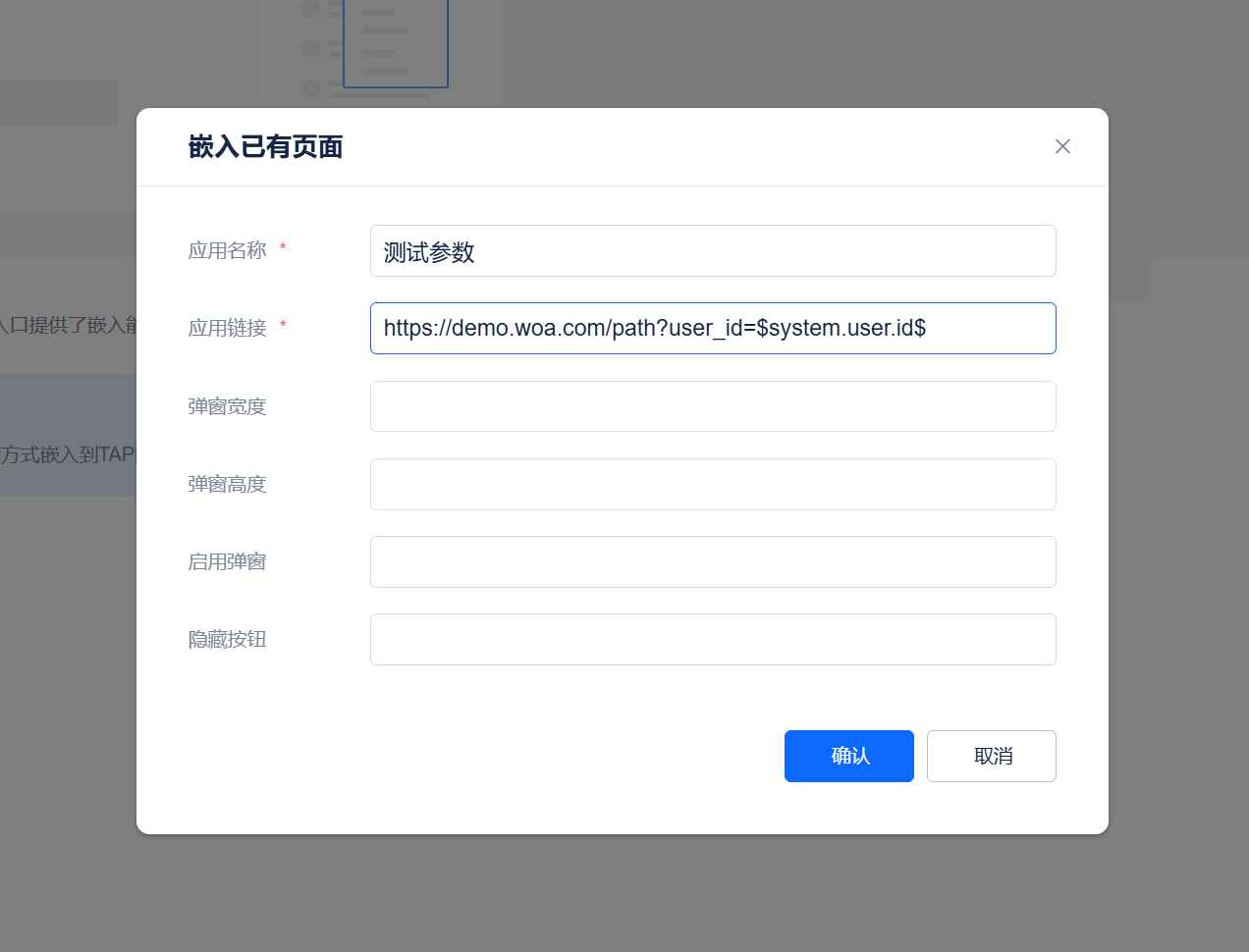
https://demo.woa.com/path,则:- 获取当前访问的用户ID:
https://demo.woa.com/path?user_id=$system.user.id$ - 获取当前访问的项目ID:
https://demo.woa.com/path?project_id=$workspace.id$
页面配置:
- 获取当前访问的用户ID:
前端JS SDK读取上下文参数 目前支持npm的方式使用TAPD OPEN JS SDK
npm i @tencent/tapd-open-js-sdk@latest1获取TAPD提供的上下文参数(只在页面被TAPD嵌入的情况下有效)
// 初始化JS-SDK
this.sdk = SDK();
// 获取扩展点上下文数据
const entranceData = await this.sdk.context.getEntranceData();
1
2
3
4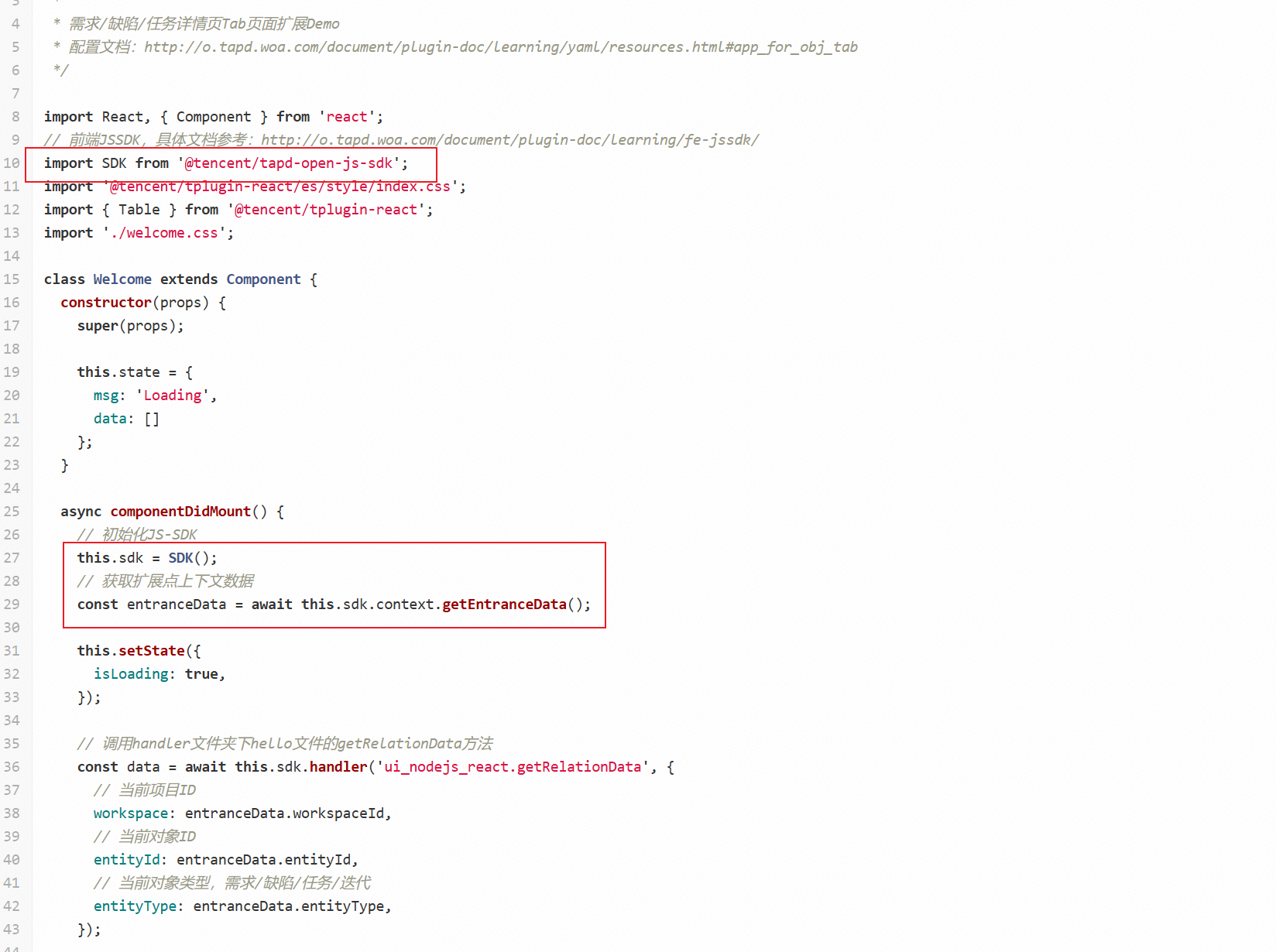
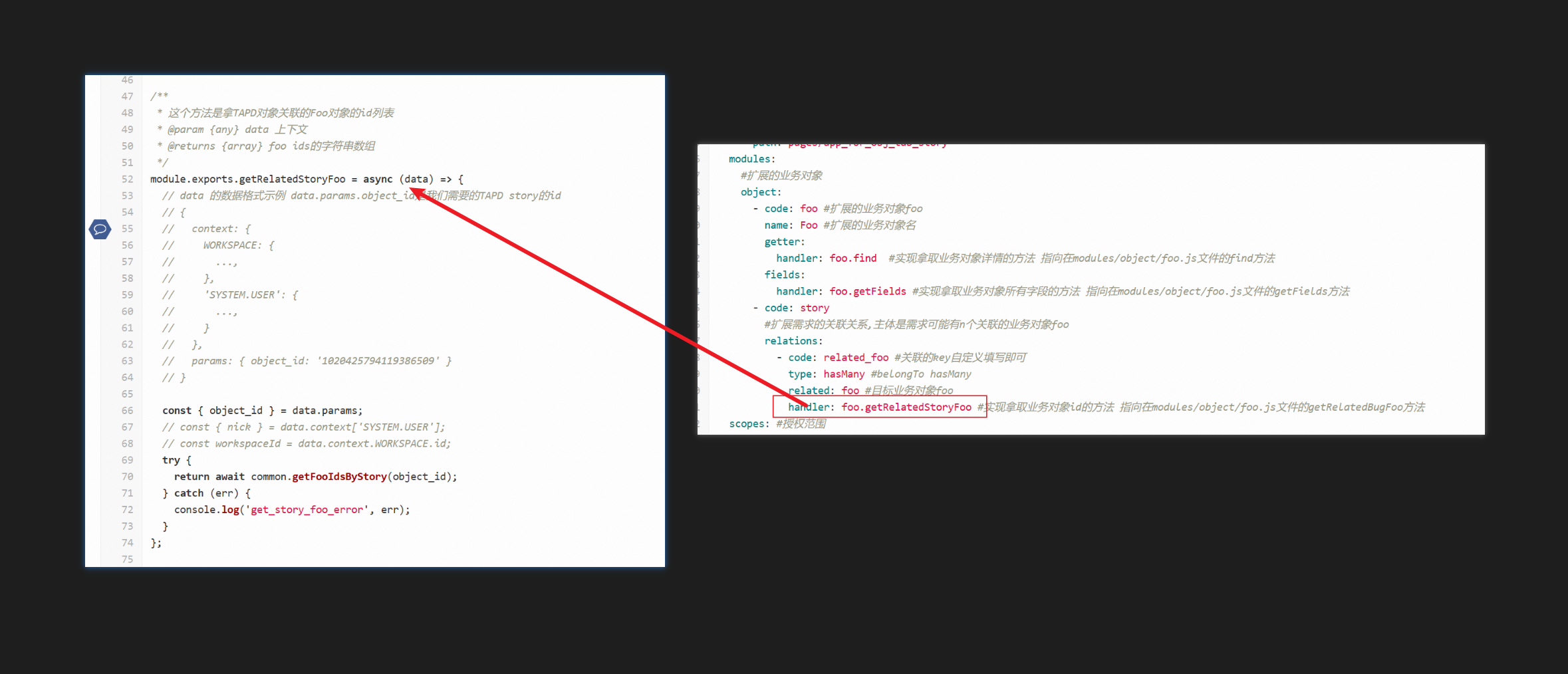
handler被调用时接收上下文参数
TAPD在调用handler时,会根据场景传递相关上下文参数(项目级、系统级、业务对象级),具体请查看每个模块关于上下文参数的说明,您也可以在开发阶段直接打印handler接收的参数,查阅上下文。
# 业务对象级
# 业务对象通用上下文参数
| 参数名称 | 参数描述 |
|---|---|
| object.type | 业务对象类型,值范围:story,bug,task,iteration |
| object.id | 业务对象 ID |
# story 上下文参数
| 参数名称 | 参数描述 |
|---|---|
| object.name | 标题 |
| object.short_id | 短id |
| object.workitem_type_id | 需求类型id |
| object.creator | 创建人 |
| object.created | 创建时间 |
| object.modified | 编辑时间 |
| object.parent_id | 父需求id |
| object.children_id | 子需求id,用|号分割 |
| object.ancestor_id | 祖先业务对象id |
| object.path | 祖先需求到本需求的所有需求id,用::符号连接 |
| object.workspace_id | 项目id |
| object.status | 状态英文名 |
| object.priority | 优先级 |
| object.owner | 处理人 |
| object.cc | 抄送人 |
| object.begin | 开始时间 |
| object.due | 预计结束时间 |
| object.source | - |
| object.iteration_id | 迭代id |
| object.module | 模块 |
| object.completed | 完成时间 |
| object.templated_id | 创建模板 |
| object.business_value | 业务价值 |
| object.size | - |
| object.effort | 预估工时 |
| object.effort_completed | 完成工时 |
| object.exceed | 超出工时 |
| object.remain | 剩余工时 |
| object.progress | 进度 |
| object.release_id | - |
| object.feature | - |
| object.developer | 开发人员 |
| object.test_focus | 测试重点 |
| object.category_id | 分类 |
| object.version | 版本 |
| object.confidential | - |
| object.created_from | - |
| object.label | 标签 |
| object.custom_field_one | 自定义字段一(可能会有) |
| object.custom_field_two | 自定义字段二(可能会有) |
| object.custom_field_9 | 自定义字段九(可能会有),大于八用阿拉伯数字 |
# bug 上下文参数
| 参数名称 | 参数描述 |
|---|---|
| object.title | 标题 |
| object.short_id | 短id |
| object.project_id | 项目id |
| object.module | 模块 |
| object.milestone | - |
| object.reporter | 创建人 |
| object.deadline | 解决期限 |
| object.created | 创建时间 |
| object.resolved | 解决时间 |
| object.closed | 关闭时间 |
| object.modified | 最后修改时间 |
| object.lastmodify | 最后修改人 |
| object.auditer | 审核人 |
| object.de | 开发人员 |
| object.te | 测试人员 |
| object.confirmer | 验证人 |
| object.current_owner | 处理人 |
| object.participator | 参与人 |
| object.closer | 关闭人 |
| object.status | - |
| object.resolution | 解决方法 |
| object.priority | 优先级 |
| object.severity | 严重程度 |
| object.platform | 软件平台 |
| object.os | 操作系统 |
| object.testmode | 测试方式 |
| object.testtype | 测试类型 |
| object.testphase | 测试阶段 |
| object.source | 缺陷根源 |
| object.frequency | 重现规律 |
| object.cc | 抄送人 |
| object.estimate | 预计解决时间 |
| object.flows | - |
| object.version_report | 发现版本 |
| object.version_test | 验证版本 |
| object.version_fix | 合入版本 |
| object.version_close | 关闭版本 |
| object.regression_number | - |
| object.issue_id | - |
| object.created_from | - |
| object.baseline_find | 发现基线 |
| object.baseline_join | 合入基线 |
| object.baseline_close | 关闭基线 |
| object.baseline_test | 验证基线 |
| object.story_id | - |
| object.originphase | 发现阶段 |
| object.sourcephase | 引入阶段 |
| object.bugtype | 缺陷类型 |
| object.feature | - |
| object.in_progress_time | 接受处理时间 |
| object.verify_time | 验证时间 |
| object.reject_time | 拒绝时间 |
| object.reopen_time | 重新打开时间 |
| object.audit_time | - |
| object.suspend_time | - |
| object.assigned_time | 分配时间 |
| object.iteration_id | 迭代 |
| object.template_id | 创建模板 |
| object.begin | 预计开始 |
| object.due | 预计结束 |
| object.release_id | - |
| object.fixer | 修复人 |
| object.label | 标签 |
| object.effort | 预估工时 |
| object.effort_completed | 完成工时 |
| object.exceed | 超出工时 |
| object.remain | 剩余工时 |
| object.size | 规模 |
| object.custom_field_one | 自定义字段一(可能会有) |
| object.custom_field_two | 自定义字段二(可能会有) |
| object.custom_field_6 | 自定义字段六(可能会有),大于五用阿拉伯数字 |
# task 上下文参数
| 参数名称 | 参数描述 |
|---|---|
| object.name | 标题 |
| object.short_id | 任务短id |
| object.creator | 创建人 |
| object.created | 创建时间 |
| object.modified | 最后修改时间 |
| object.workspace_id | - |
| object.status | 状态 |
| object.priority | 优先级 |
| object.owner | 处理人 |
| object.cc | 抄送人 |
| object.begin | 预计开始 |
| object.due | 预计结束 |
| object.story_id | 需求 |
| object.iteration_id | - |
| object.completed | 完成时间 |
| object.effort | 预估工时 |
| object.effort_completed | 完成工时 |
| object.exceed | 超出工时 |
| object.remain | 剩余工时 |
| object.progress | 进度 |
| object.has_attachment | - |
| object.label | - |
| object.release_id | - |
| object.custom_field_one | 任务的自定义字段一(可能会有) |
| object.custom_field_two | 任务的自定义字段二(可能会有) |
| object.custom_field_9 | 任务的自定义字段九(可能会有),大于八用阿拉伯数字 |
# iteration 上下文参数
| 参数名称 | 参数描述 |
|---|---|
| object.name | 标题 |
| object.release_id | - |
| object.workspace_id | - |
| object.startdate | - |
| object.enddate | - |
| object.creator | - |
| object.created | - |
| object.modified | - |
| object.completed | - |
| object.status | - |
| object.custom_field_1 | 迭代的自定义字段一(可能会有) |
| object.custom_field_2 | 迭代的自定义字段二(可能会有) |
# 项目级
项目级上下文参数支持所有项目级扩展页面、业务对象级扩展页面
| 参数名称 | 参数描述 |
|---|---|
| workspace.id | 当前所在项目id |
| workspace.name | 当前所在项目名称 |
| workspace.pretty_name | 当前所在项目英文名称 |
| workspace.parent_id | 当前所在项目父项目id |
| workspace.created | 当前所在项目创建时间 |
| workspace.creator | 当前所在项目创建人 |
| workspace.status | 当前所在项目状态 |
# 系统级
系统级上下文参数支持所有扩展页面
| 参数名称 | 参数描述 |
|---|---|
| system.user.id | 当前登录用户id |
| system.user.nick | 当前登录用户nick |
| system.user.name | 当前登录用户名字 |
| system.user.name_pinyin | 当前登录用户拼音名 |
| system.user.enabled | 当前登录用户状态 |
| system.user.status_name | 当前登录用户是否在职 |
| system.user.bu_id | 当前登录用户bu_id |
| system.user.bu_name | 当前登录用户bu_name |
| system.user.dept_id | 当前登录用户dept_id |
| system.user.dept_name | 当前登录用户dept_name |
| system.user.group_id | 当前登录用户group_id |
| system.user.group_name | 当前登录用户group_name |
| system.user.group_names | 当前登录用户group_names |
| system.user.post_name | 当前登录用户post_name |
# 事件通信
如果嵌入的页面需要和TAPD的页面进行交互,可通过TAPD提供的JSSDK完成交互。
# 安装
# 使用
# SDK方法
# SDK-调用TAPDUI
调用tapd的消息提示组件
.alert(message: string)sdk.ui.alert('Hello World')1调用TAPD侧的确认框
.confirm(message: string) => Promisesdk.ui.confirm('来个点赞3连?') .then(() => { alert('THX 😍') })1
2
3
4调用TAPD侧弹框
.openDialog(params)sdk.ui.openDialog(params)1- 参数说明:
title: string   (弹窗标题)
url: string   (弹窗URL)
height: number    (高度)
width: number   (宽度)
showBtn: boolean    (是否显示确认按钮)
btnYesText: string    (确认按钮文本)
btnNoText: string   (取消按钮文本)
1
2
3
4
5
6
7关闭TAPD侧弹窗
.closeDialog()sdk.ui.closeDialog()1调整弹框大小
.resizeDialog(width: number, height: number)sdk.ui.resizeDialog(300, 400)1在tapd全屏显示图片预览
.showImage(data: string)注意: 需要安装
3.25.0及以上版本的open-js-sdk。// url sdk.ui.showImage('https://file.tapd.woa.com/xxxxxx/files/get_logo/xxxxxx.jpg') // base64 sdk.ui.showImage('data:image/png;base64,xxxxxxxxxxxxxxxxxxxxxxxxxxxxxxxxxxxxxxxxxx')1
2
3
4
# SDK-调用插件handler
- function调用
.handler(handlerName: string, params = {}) => Promise <res>sdk.handler('story', {id: 'tsets'});1- 参数说明:
handlerName: 接口名
params: 传递给接口的参数。只支持普通对象
1
2
# SDK-调用navigator
于TAPD侧打开调用sdk的嵌入应用新的页面。url 为嵌入应用的路由
.openAppIndex(url: string)sdk.navigator.openAppIndex('/about')1打开TAPD业务对象的详情页(目前只支持需求,任务,缺陷)
.openObjectWindow(params: { entityType: string, entityId: string })sdk.navigator.openObjectWindow({entityType: 'story', entityId: '123'})1更新当前浏览器的路由,一般用于同步嵌入应用路由与浏览器路由
.syncUrl(options: {url: string, refresh: bolean})sdk.navigator.syncUrl({url: 'exmaple.com', refresh: true})1- 参数说明:
url: 目标路由
refresh: 更新路由后是否刷新页面
1
2更新Tab页扩展模块的数值
.updateTabCount({count: number, refresh: bolean})sdk.navigator.updateTabCount({count: 100, refresh: false})1- 参数说明:
count: 数值
refresh: 更新路由后是否刷新页面(默认为false)
1
2详情页Tab切换(目前只支持需求,任务,缺陷详情页)
.openObjectTab({tabName: string})sdk.navigator.openObjectTab({tabName: '变更历史'})1- 参数说明:
tabName: Tab名称1
# SDK-获取context
获取当前页面嵌入TAPD的配置信息
.getEntranceData() => Promise <entranceConfigs >const entranceConfigs = await sdk.context.getEntranceData() // return {appId, entranceId, code}1- 返回值说明:
返回 entranceConfigs
appId: 应用ID
code: tapd Token
entranceId: 挂载点ID
1
2
3
4更新tapd授予码code,一般用于授权码过期
.refreshCode() => Promise <code>const newCode = await sdk.context.refreshCode()1
# SDK-iframe通信
当在TAPD的页面中有多个挂载点页面,可以通过这个方法在不同挂载点间通信
.syncPageEvent(params: {entranceId: string, data: any}) => Promisesdk.iframe.syncPageEvent({ entranceId: 'app_for_obj_detail_bottom_card', data: { msg: '下次一定' } })1
2
3
4
5
6调整应用在TAPD侧的高度
.setPageHeight(height: number)sdk.iframe.setPageHeight(400)1
# SDK-调用command
当嵌入应用页面在tapd的业务对象(需求,任务,缺陷)详情页面,将更新页面里的附件列表
.refreshAttachmentList()sdk.command.refreshAttachmentList()1当嵌入应用页面在tapd的业务对象(需求,任务,缺陷)详情页面, 可以唤起挂在类型为 app_for_obj_detail_bottom_card 的挂载页面
.showObjDetailBottomCard()sdk.command.showObjDetailBottomCard()1
# SDK-调用request
调用tapd侧的人名搜索接口
.getUserListByKeyWords(params: {key_word: string, workspace_id: string, per_page: number}, configs: {timeout: number }) => Promise <response>sdk.request .getUserListByKeyWords({ key_word: 'tom', workspace_id: '1' }) .then((response) => { console.log(response) })1
2
3
4
5
6
7
8- 参数说明:
keyword: String (搜素的关键字)
workspace_id: String (TAPD项目ID)
1
2- 返回值说明:
返回 response
data: Array (用户列表)
1
2调用TAPD侧获取项目下人员名单接口
.getWorkspaceMemberList(params: {workspace_id: string,page_size: number, page: number }) => Promise<response>sdk.request .getWorkspaceMemberList({ page_size: 100, workspace_id: '1', page: 1 }) .then((response) => { console.log(response) })1
2
3
4
5
6
7
8
9- 参数说明:
page_size: Number (每页条数)
workspace_id: String (TAPD项目ID)
page: Number (第几页)
1
2
3- 返回值说明:
返回 response
data: Array (用户列表)
count: String (总人数)
1
2
3获取对象相关成员名单
.getAllRelateMember(params: object}) => Promisesdk.request.getAllRelateMember({ workspace_id: '755', entity_type: 'bug', entity_id: '1000000755089798713', include_self: 1 include_relate_story_member: 0 include_sub_story_member: 0 }) .then((response) => { console.log(response) })1
2
3
4
5
6
7
8
9
10
11- 参数说明:
workspace_id: String (TAPD项目ID)
entity_type: String (资源类型: story|bug|task)
include_self: Number (是否包括用户: 0 | 1)
include_relate_story_member: Number (是否包含关联需求: 0 | 1)
include_sub_story_member: Number (是否包含子需求: 0 | 1)
1
2
3
4
5- 返回值说明:
返回 response
data: Array (用户列表)
1
2
# SDK-event监听
监听来着TAPD侧的事件
.on(event: string, cb: data => res, config: {once: bolean})sdk.events.on('ConfirmYes', function() { return { id: 'target Objct ID' } }, { once: true })1
2
3
4
5
6
7- 参数说明:
event: 事件名
cb: 回调函数,参数为接受的数据,当在函数中返回数据时,将会把返回的数据发回给TAPD
once: 是否只监听一次
1
2
3发送事件给TAPD侧
.send({event: string, params: obj})// 特定的挂在点接受特定的事件,如下例子为列表更多操作拓展获取筛选条件、选中项目 const selected = await sdk.events.send({ event: 'getSelectedContext', })1
2
3
4- 参数说明:
event: 事件名1